> ## Documentation Index
> Fetch the complete documentation index at: https://second.tech/docs/llms.txt
> Use this file to discover all available pages before exploring further.
# Manage your Bark Pay wallet
> Read the balances of your Bark Pay wallet, deposit bitcoin to it, and send manual payouts over Lightning, Ark, or on-chain from the Wallet page.
Customer payments settle into the wallet of the charge's mode, live or test. You pay out from that same wallet.
 ## Read your balances
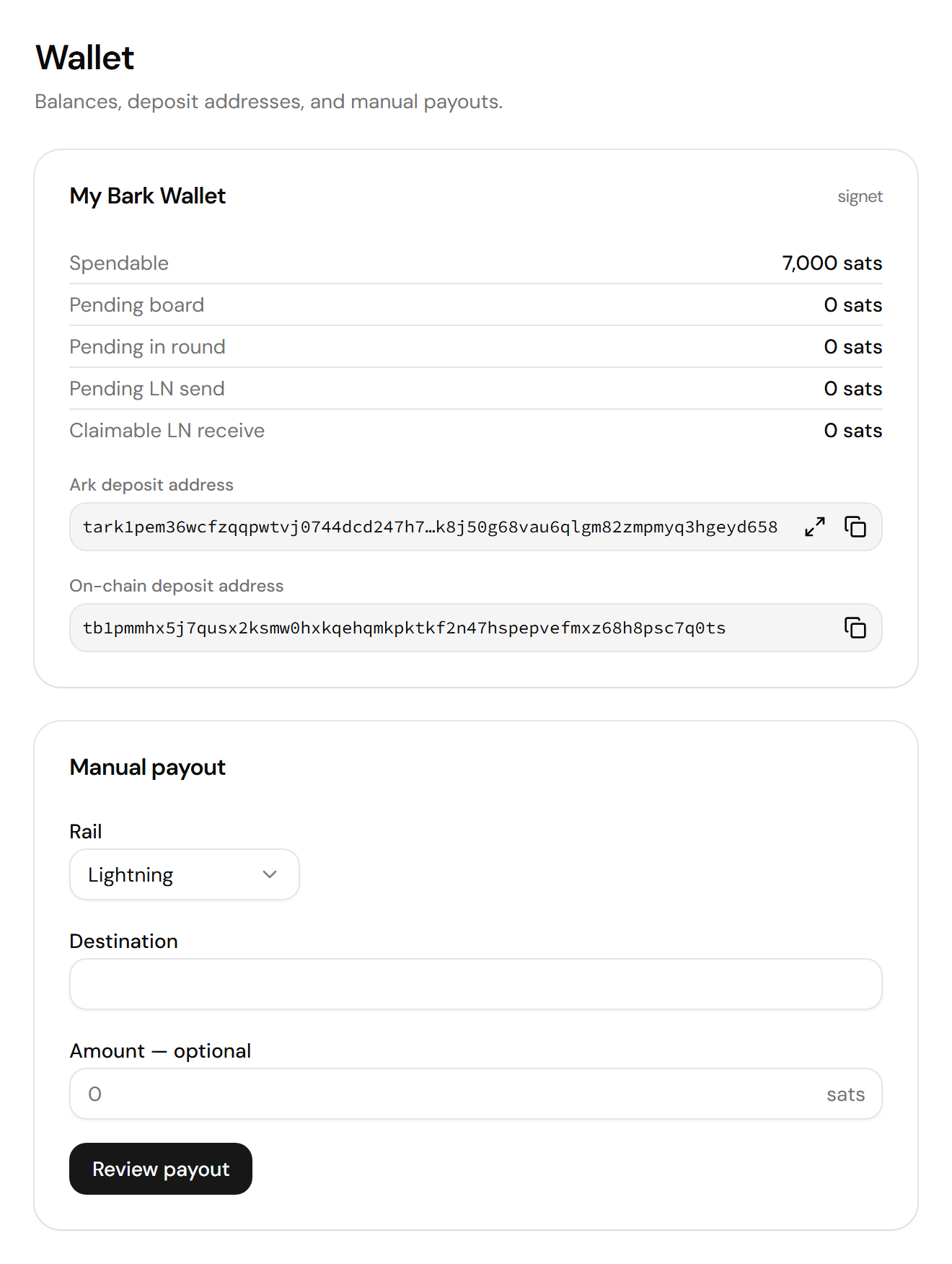
The wallet card, titled **My Bark Wallet** in live mode and **signet** in test mode, lists one row per state:
| Balance | What it holds |
| - | - |
| Spendable | What you can pay out over Lightning or Ark. |
| Pending board | Bitcoin from a [board](/docs/learn/board) waiting for on-chain confirmations. Bark Pay never boards on-chain payments on its own. |
| Pending in round | Bitcoin in a [round](/docs/learn/rounds) that hasn't completed. |
| Pending LN send | A Lightning payout that hasn't settled. |
| Claimable LN receive | A Lightning payment Barkd has yet to claim. |
| On-chain spendable | Bitcoin in Barkd's on-chain wallet that an On-chain payout can spend. |
| On-chain pending | An on-chain payment that hasn't confirmed yet. |
On-chain payments, to a charge or to the on-chain deposit address, land in Barkd's separate on-chain wallet, shown in the two on-chain rows. They leave it only through an [On-chain payout](#manual-payout).
## Deposit bitcoin
The wallet card shows two deposit addresses. Copy the one that matches how you want to send:
* **Ark deposit address:** For a payment from a wallet app on the same Ark server. It arrives in the spendable balance.
* **On-chain deposit address:** For a regular on-chain payment. It lands in [Barkd's on-chain wallet](#read-your-balances).
## Manual payout
Use **Manual payout** to move bitcoin out: to your own cold storage, to a supplier, or to refund a customer.
The dashboard accepts at most ten payouts per minute from one IP address.
* **Lightning:** Pays a BOLT11 invoice, a BOLT12 offer, or a Lightning address.
* **Ark:** Pays an Ark address on the same Ark server.
* **On-chain:** Pays an on-chain address from Barkd's on-chain wallet.
Paste a bare invoice, offer, or address, not a `bitcoin:` payment link. If it belongs to another rail, Bark Pay tells you which one to select.
A BOLT11 invoice with a fixed amount fills the field and locks it. A Lightning address always needs an amount, even though the field reads optional.
The **Confirm payout** drawer summarizes the amount, rail, wallet, and destination.
A **Payout sent.** toast confirms that Barkd accepted it. A Lightning payout stays under **Pending LN send** until it settles.
A payout cannot be undone once sent. If Bark Pay reports that the send outcome is unknown, check whether the payout went through before you retry, so you don't pay twice. For a Lightning or Ark payout, reload the Wallet page and check the **Spendable** row. For an On-chain payout, look up the destination address in a block explorer.
Sends to an Ark address are free. Lightning sends carry the Ark server's [fees](/docs/learn/fees), which scale with the amount and your VTXOs' remaining lifetime. On-chain sends pay the usual miner fee. See [Second's pricing](https://second.tech/pricing).
This documentation is built and hosted on [Mintlify](https://mintlify.com), a developer documentation platform.
## Read your balances
The wallet card, titled **My Bark Wallet** in live mode and **signet** in test mode, lists one row per state:
| Balance | What it holds |
| - | - |
| Spendable | What you can pay out over Lightning or Ark. |
| Pending board | Bitcoin from a [board](/docs/learn/board) waiting for on-chain confirmations. Bark Pay never boards on-chain payments on its own. |
| Pending in round | Bitcoin in a [round](/docs/learn/rounds) that hasn't completed. |
| Pending LN send | A Lightning payout that hasn't settled. |
| Claimable LN receive | A Lightning payment Barkd has yet to claim. |
| On-chain spendable | Bitcoin in Barkd's on-chain wallet that an On-chain payout can spend. |
| On-chain pending | An on-chain payment that hasn't confirmed yet. |
On-chain payments, to a charge or to the on-chain deposit address, land in Barkd's separate on-chain wallet, shown in the two on-chain rows. They leave it only through an [On-chain payout](#manual-payout).
## Deposit bitcoin
The wallet card shows two deposit addresses. Copy the one that matches how you want to send:
* **Ark deposit address:** For a payment from a wallet app on the same Ark server. It arrives in the spendable balance.
* **On-chain deposit address:** For a regular on-chain payment. It lands in [Barkd's on-chain wallet](#read-your-balances).
## Manual payout
Use **Manual payout** to move bitcoin out: to your own cold storage, to a supplier, or to refund a customer.
The dashboard accepts at most ten payouts per minute from one IP address.
* **Lightning:** Pays a BOLT11 invoice, a BOLT12 offer, or a Lightning address.
* **Ark:** Pays an Ark address on the same Ark server.
* **On-chain:** Pays an on-chain address from Barkd's on-chain wallet.
Paste a bare invoice, offer, or address, not a `bitcoin:` payment link. If it belongs to another rail, Bark Pay tells you which one to select.
A BOLT11 invoice with a fixed amount fills the field and locks it. A Lightning address always needs an amount, even though the field reads optional.
The **Confirm payout** drawer summarizes the amount, rail, wallet, and destination.
A **Payout sent.** toast confirms that Barkd accepted it. A Lightning payout stays under **Pending LN send** until it settles.
A payout cannot be undone once sent. If Bark Pay reports that the send outcome is unknown, check whether the payout went through before you retry, so you don't pay twice. For a Lightning or Ark payout, reload the Wallet page and check the **Spendable** row. For an On-chain payout, look up the destination address in a block explorer.
Sends to an Ark address are free. Lightning sends carry the Ark server's [fees](/docs/learn/fees), which scale with the amount and your VTXOs' remaining lifetime. On-chain sends pay the usual miner fee. See [Second's pricing](https://second.tech/pricing).
This documentation is built and hosted on [Mintlify](https://mintlify.com), a developer documentation platform.