> ## Documentation Index
> Fetch the complete documentation index at: https://second.tech/docs/llms.txt
> Use this file to discover all available pages before exploring further.
# Wallet backups
Before receiving any payments, make sure you back up your wallet.
1. **[Write down your seed phrase](#write-down-your-seed-phrase):** This is enough to recover your balance in the event of a system failure. Recovery from the seed phrase alone requires the Ark server's cooperation, and it doesn't restore your payment history or the state of any in-progress exits.
2. **[Set up continuous backups](#set-up-continuous-backups)** (optional): A backup that you fully control, with your entire payment history included.
The [Backups](/docs/backups) page explains the mechanics behind both in more depth.
## Write down your seed phrase
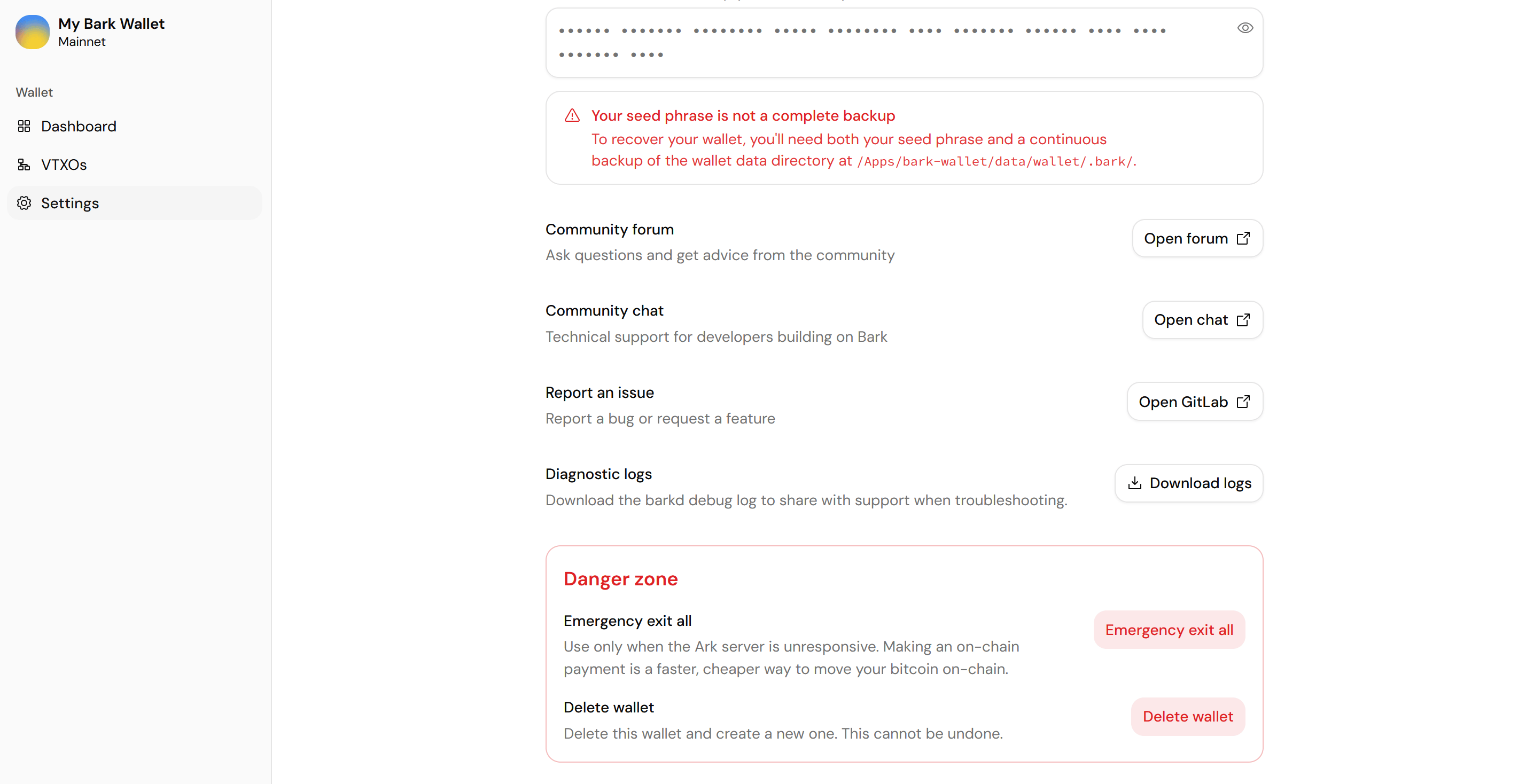
Select **Settings** in the wallet app's sidebar.
Scroll to the **Seed phrase** field at the bottom of the page and select the eye icon.
Copy them in order, somewhere safe and offline. The seed phrase never changes, so this is a one-time step.
 ## Set up continuous backups
We don't have a mature continuous backup solution for Bark Wallet on Umbrel yet. For adventurous users, some options to consider:
* **[Native umbrelOS backups](https://umbrel.com/support/backups-and-recovery/backing-up-your-data):** Encrypted backups of your Umbrel, wallet directory included, taken every hour.
Sync apps in the Umbrel App Store, such as Syncthing and Duplicati, can't reach the wallet directory.
If a backup misses your latest wallet changes, recovering your whole balance will require [restoring from your seed phrase](/docs/bark-wallet/restore), which relies on the Ark server's cooperation.
Bark Wallet on StartOS makes continuous backups automatically from the moment you launch the app, using the external backup target you set up during [installation](/docs/bark-wallet/install).
On every change in wallet state (send, receive, refresh, exit), an encrypted snapshot of your wallet data is sent to that target.
We'd still recommend you run a manual test to confirm the backups are working.
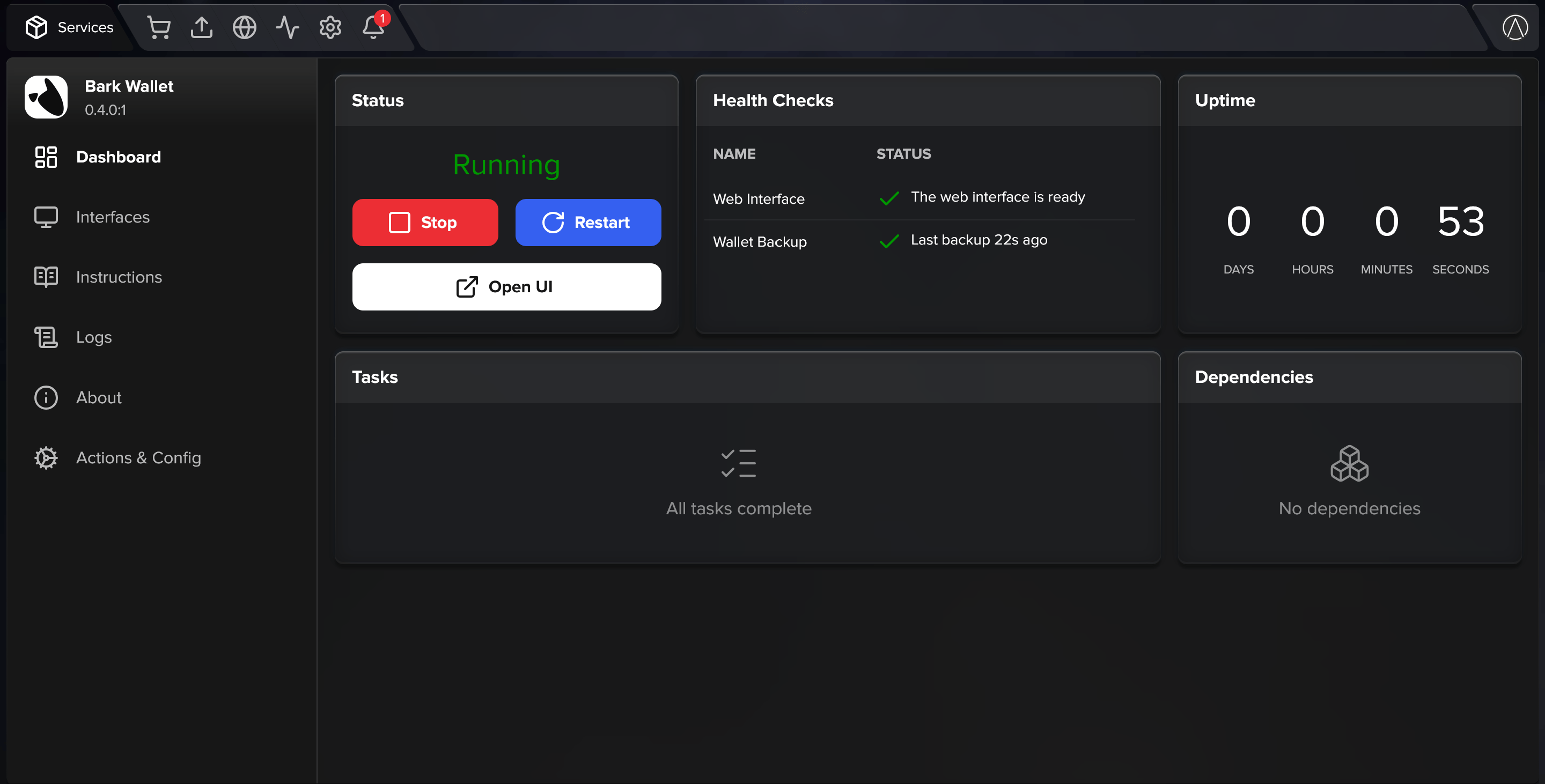
Go to the service's **Actions & Config** and select **Back Up Now**.
Once the run succeeds, the service's **Wallet Backup** health check shows your last backup time. Every later backup is automatic.
## Set up continuous backups
We don't have a mature continuous backup solution for Bark Wallet on Umbrel yet. For adventurous users, some options to consider:
* **[Native umbrelOS backups](https://umbrel.com/support/backups-and-recovery/backing-up-your-data):** Encrypted backups of your Umbrel, wallet directory included, taken every hour.
Sync apps in the Umbrel App Store, such as Syncthing and Duplicati, can't reach the wallet directory.
If a backup misses your latest wallet changes, recovering your whole balance will require [restoring from your seed phrase](/docs/bark-wallet/restore), which relies on the Ark server's cooperation.
Bark Wallet on StartOS makes continuous backups automatically from the moment you launch the app, using the external backup target you set up during [installation](/docs/bark-wallet/install).
On every change in wallet state (send, receive, refresh, exit), an encrypted snapshot of your wallet data is sent to that target.
We'd still recommend you run a manual test to confirm the backups are working.
Go to the service's **Actions & Config** and select **Back Up Now**.
Once the run succeeds, the service's **Wallet Backup** health check shows your last backup time. Every later backup is automatic.
 Keep taking regular [StartOS backups](https://docs.start9.com/start-os/0.4.0.x/backup-create.html) too, under **System** > **Create Backup**, and take a new one whenever you change backup targets. They deliberately leave the wallet database out, but they carry your seed phrase and your backup-target credentials: if you ever restore one, the service pulls the freshest wallet snapshot from your backup target automatically. Your StartOS master password encrypts these backups, so keep it safe.
We don't have a mature continuous backup solution for self-hosted installs yet. For adventurous users, some options to consider:
* **[bark-backupd](https://gitlab.com/ark-bitcoin/labs/bark-backupd):** Second's experimental backup daemon. It runs alongside `barkd` and, on every change, snapshots the wallet database, encrypts the snapshot with a key derived from your seed phrase, and ships it to your chosen targets: a USB drive, Nextcloud, Google Drive, or anything S3-compatible. Test `bark-backupd restore` before you rely on it.
* **[Litestream](https://litestream.io/):** A streaming replicator that keeps a live, off-machine copy of the wallet database. The wallet database isn't formally tested in the WAL journal mode Litestream requires, so treat the approach as experimental.
If a backup misses your latest wallet changes, recovering your whole balance will require [restoring from your seed phrase](/docs/bark-wallet/restore), which relies on the Ark server's cooperation.
For restoring a wallet backup, see [Restore your wallet](/docs/bark-wallet/restore).
Keep taking regular [StartOS backups](https://docs.start9.com/start-os/0.4.0.x/backup-create.html) too, under **System** > **Create Backup**, and take a new one whenever you change backup targets. They deliberately leave the wallet database out, but they carry your seed phrase and your backup-target credentials: if you ever restore one, the service pulls the freshest wallet snapshot from your backup target automatically. Your StartOS master password encrypts these backups, so keep it safe.
We don't have a mature continuous backup solution for self-hosted installs yet. For adventurous users, some options to consider:
* **[bark-backupd](https://gitlab.com/ark-bitcoin/labs/bark-backupd):** Second's experimental backup daemon. It runs alongside `barkd` and, on every change, snapshots the wallet database, encrypts the snapshot with a key derived from your seed phrase, and ships it to your chosen targets: a USB drive, Nextcloud, Google Drive, or anything S3-compatible. Test `bark-backupd restore` before you rely on it.
* **[Litestream](https://litestream.io/):** A streaming replicator that keeps a live, off-machine copy of the wallet database. The wallet database isn't formally tested in the WAL journal mode Litestream requires, so treat the approach as experimental.
If a backup misses your latest wallet changes, recovering your whole balance will require [restoring from your seed phrase](/docs/bark-wallet/restore), which relies on the Ark server's cooperation.
For restoring a wallet backup, see [Restore your wallet](/docs/bark-wallet/restore).