> ## Documentation Index
> Fetch the complete documentation index at: https://second.tech/docs/llms.txt
> Use this file to discover all available pages before exploring further.
# Understand your dashboard
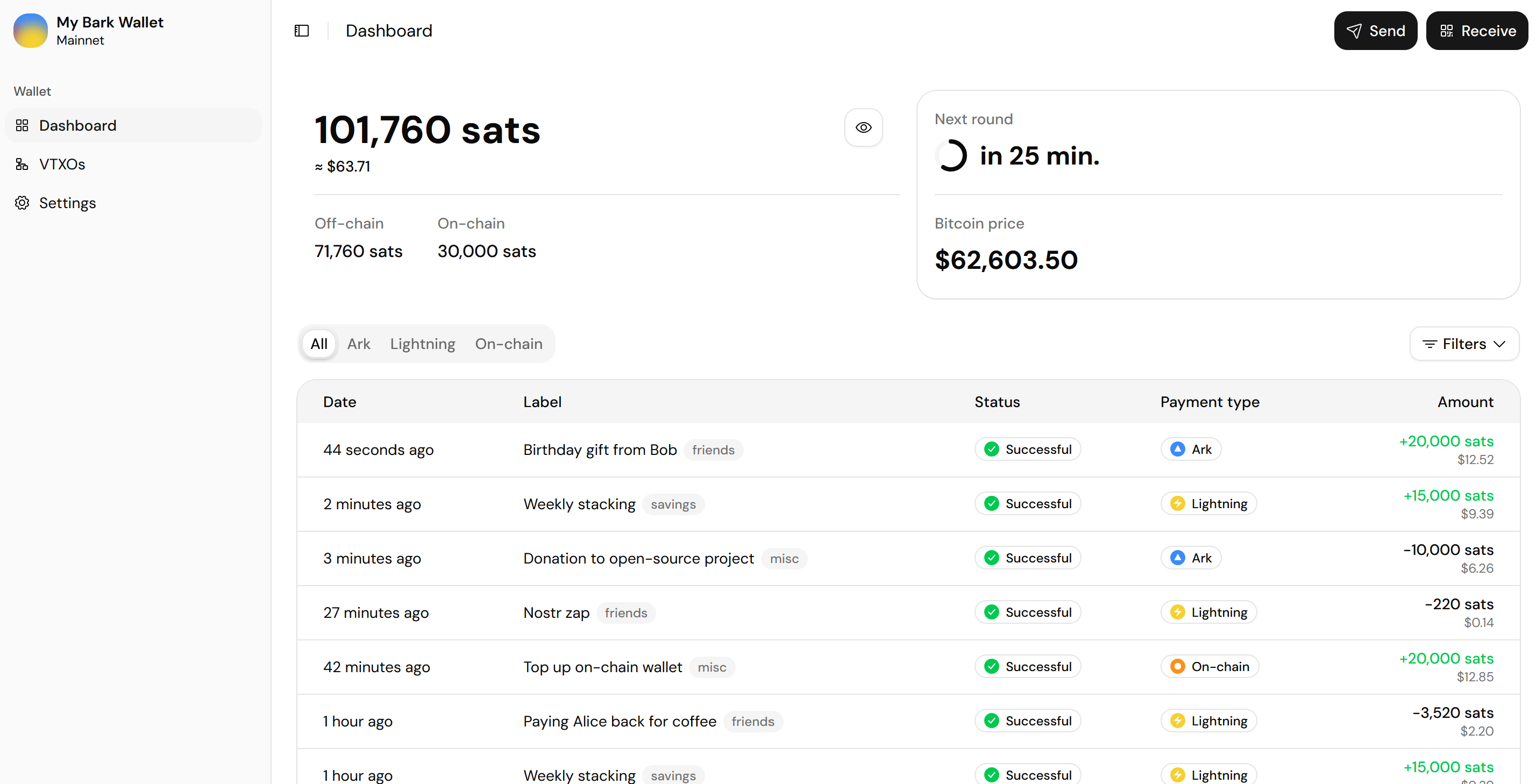
## One balance, two sub-balances
Your wallet balance is shown at the top of the dashboard, and is made up of two sub-balances:
* **Off-chain:** Where Ark and Lightning payments arrive, held in [VTXOs](/docs/learn/vtxo).
* **On-chain:** Where on-chain payments arrive, held in regular UTXOs.
Select the eye button on the balance card to turn on [discreet mode](/docs/bark-wallet/settings#display-units-and-price) and hide your balances and transaction amounts.
 ## Your off-chain balance
Your off-chain balance is the bread and butter of your wallet, where most of your transaction activity takes place.
* **Sending:** You can pay anyone from your off-chain balance, whether over [Ark, Lightning, or on-chain](/docs/bark-wallet/send-receive#send-bitcoin).
* **Receiving:** [Ark and Lightning payments](/docs/bark-wallet/send-receive#receive-bitcoin) arrive in your off-chain balance. On-chain payments arrive in your [on-chain balance](#your-on-chain-balance) instead.
## Your on-chain balance
Your on-chain balance can receive bitcoin from [on-chain payments](/docs/bark-wallet/send-receive#receive-bitcoin), [offboards](/docs/learn/offboard), and [emergency exits](/docs/learn/exit). It also covers the on-chain fees in the event you need to make an emergency exit.
To move bitcoin into or out of your on-chain balance, use the on-chain option when making a [Receive](/docs/bark-wallet/send-receive#receive-bitcoin) or [Send](/docs/bark-wallet/send-receive#send-bitcoin).
It's a good idea to maintain a small on-chain balance so that you can initiate an exit without delay if one is ever needed. That said, it's still perfectly viable to deposit on-chain bitcoin at the time of exit if you don't have any on hand—it just means one extra step when timing may matter.
## Pending sub-balances
Bitcoin on the move shows as a pending sub-balance. It counts toward your main balance, but can't be spent until it settles.
| Pending sub-balance | What it tracks |
| ---------------------- | ------------------------------------------------------------------------------------------------------------ |
| Pending on-chain | An incoming on-chain payment awaiting confirmation. |
| Pending change | Change from emergency exit fee transactions, awaiting confirmation. |
| Pending board | An on-chain deposit [boarding onto Ark](/docs/learn/board). |
| Pending in round | Bitcoin in a [refresh](/docs/bark-wallet/vtxos#the-wallet-app-refreshes-vtxos-for-you) that hasn't completed yet. |
| Pending Lightning send | An outgoing Lightning payment that hasn't settled yet. |
| Pending exit | Bitcoin pending the completion of an [emergency exit](/docs/learn/exit). |
## The next round countdown
The card beside the balance counts down to the next [round](/docs/learn/rounds), which is when queued [refreshes](/docs/bark-wallet/vtxos#the-wallet-app-refreshes-vtxos-for-you) execute.
## History
The history table mixes your payments with wallet maintenance. Maintenance entries (refreshes and exit fees) are hidden by default. Reveal them from the **Filters** menu. The **All**, **Ark**, **Lightning**, and **On-chain** tabs filter by network.
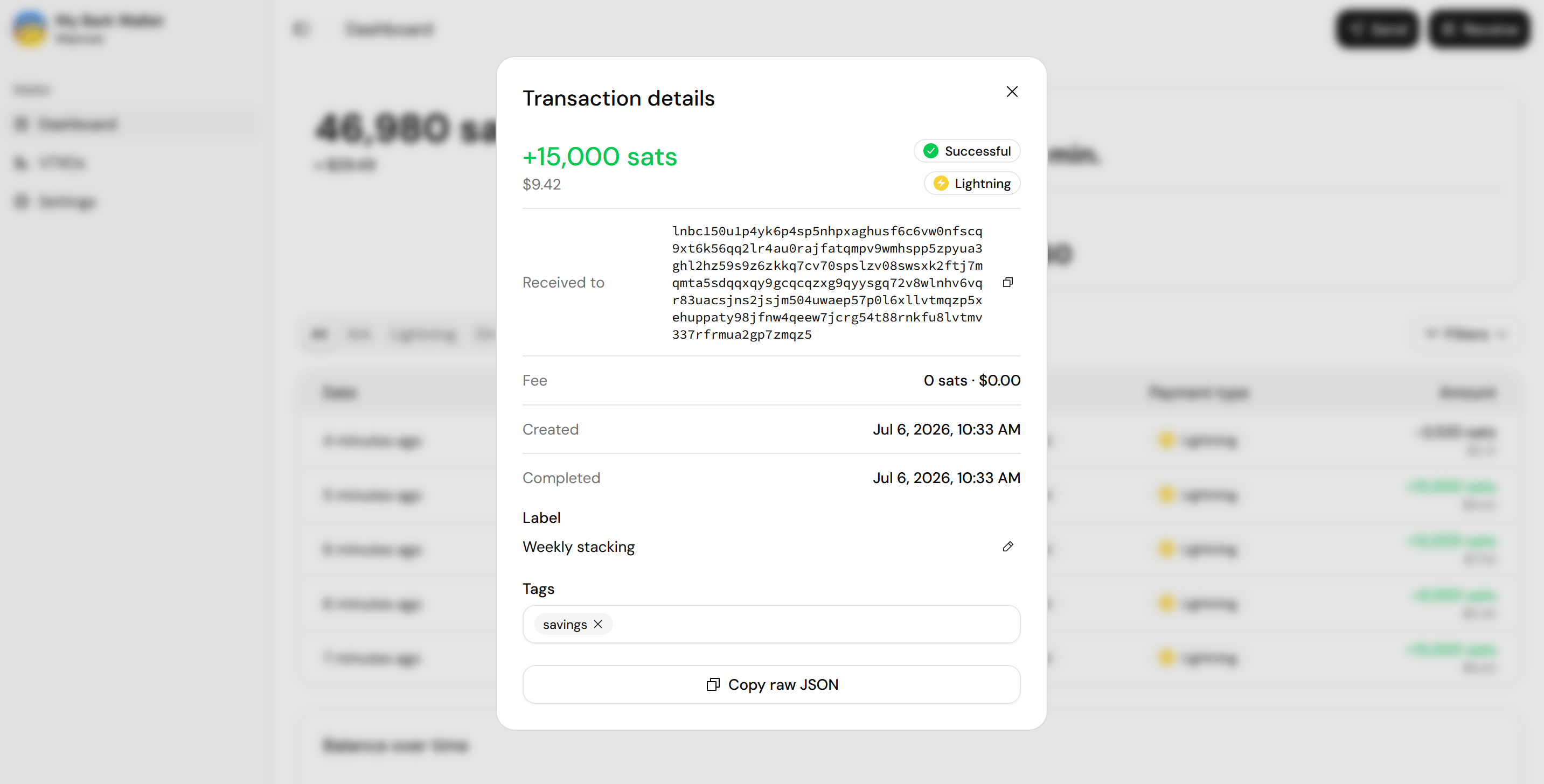
Select a row to open the transaction details:
* Where the bitcoin went or came from.
* The fee.
* Created and completed timestamps.
* An editable label and tags.
* A **Copy raw JSON** button for troubleshooting.
## Your off-chain balance
Your off-chain balance is the bread and butter of your wallet, where most of your transaction activity takes place.
* **Sending:** You can pay anyone from your off-chain balance, whether over [Ark, Lightning, or on-chain](/docs/bark-wallet/send-receive#send-bitcoin).
* **Receiving:** [Ark and Lightning payments](/docs/bark-wallet/send-receive#receive-bitcoin) arrive in your off-chain balance. On-chain payments arrive in your [on-chain balance](#your-on-chain-balance) instead.
## Your on-chain balance
Your on-chain balance can receive bitcoin from [on-chain payments](/docs/bark-wallet/send-receive#receive-bitcoin), [offboards](/docs/learn/offboard), and [emergency exits](/docs/learn/exit). It also covers the on-chain fees in the event you need to make an emergency exit.
To move bitcoin into or out of your on-chain balance, use the on-chain option when making a [Receive](/docs/bark-wallet/send-receive#receive-bitcoin) or [Send](/docs/bark-wallet/send-receive#send-bitcoin).
It's a good idea to maintain a small on-chain balance so that you can initiate an exit without delay if one is ever needed. That said, it's still perfectly viable to deposit on-chain bitcoin at the time of exit if you don't have any on hand—it just means one extra step when timing may matter.
## Pending sub-balances
Bitcoin on the move shows as a pending sub-balance. It counts toward your main balance, but can't be spent until it settles.
| Pending sub-balance | What it tracks |
| ---------------------- | ------------------------------------------------------------------------------------------------------------ |
| Pending on-chain | An incoming on-chain payment awaiting confirmation. |
| Pending change | Change from emergency exit fee transactions, awaiting confirmation. |
| Pending board | An on-chain deposit [boarding onto Ark](/docs/learn/board). |
| Pending in round | Bitcoin in a [refresh](/docs/bark-wallet/vtxos#the-wallet-app-refreshes-vtxos-for-you) that hasn't completed yet. |
| Pending Lightning send | An outgoing Lightning payment that hasn't settled yet. |
| Pending exit | Bitcoin pending the completion of an [emergency exit](/docs/learn/exit). |
## The next round countdown
The card beside the balance counts down to the next [round](/docs/learn/rounds), which is when queued [refreshes](/docs/bark-wallet/vtxos#the-wallet-app-refreshes-vtxos-for-you) execute.
## History
The history table mixes your payments with wallet maintenance. Maintenance entries (refreshes and exit fees) are hidden by default. Reveal them from the **Filters** menu. The **All**, **Ark**, **Lightning**, and **On-chain** tabs filter by network.
Select a row to open the transaction details:
* Where the bitcoin went or came from.
* The fee.
* Created and completed timestamps.
* An editable label and tags.
* A **Copy raw JSON** button for troubleshooting.