> ## Documentation Index
> Fetch the complete documentation index at: https://second.tech/docs/llms.txt
> Use this file to discover all available pages before exploring further.
# Understand your balances
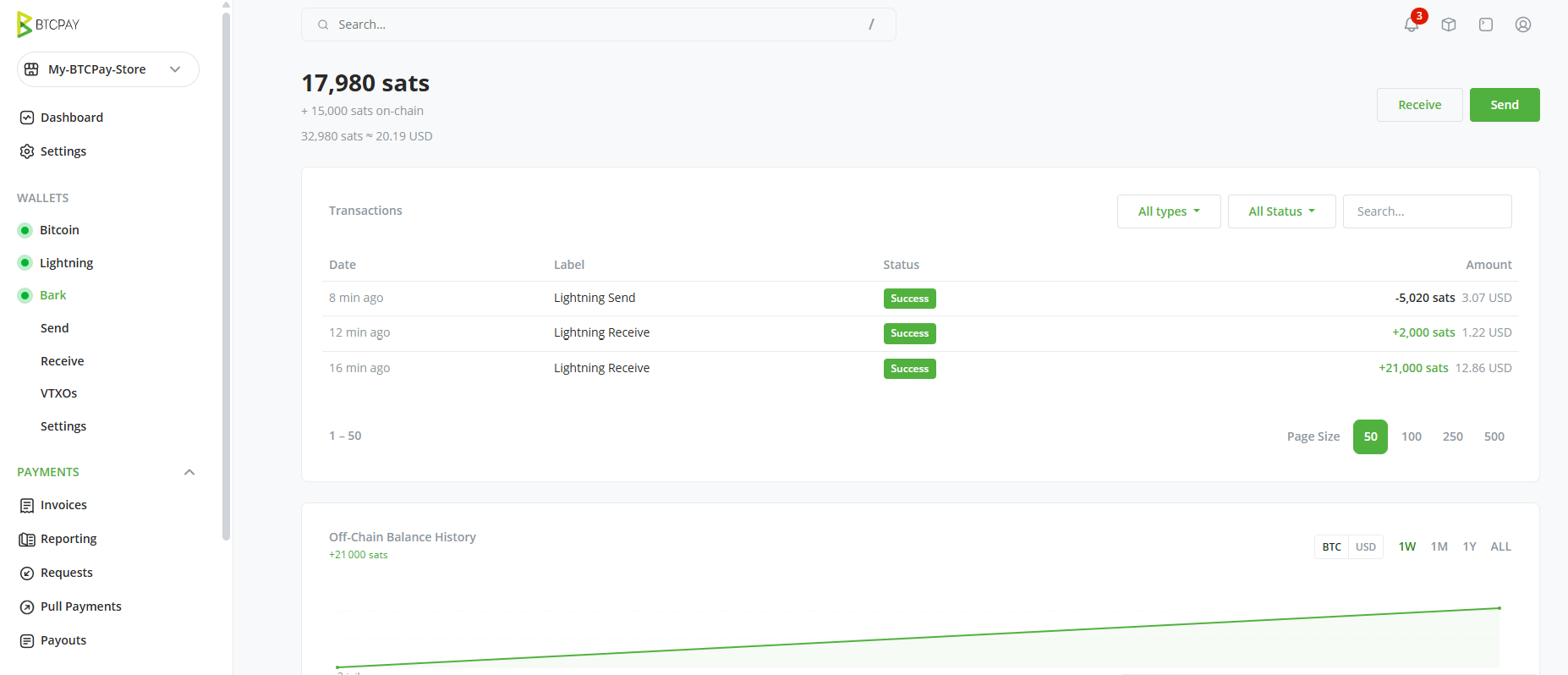
Select **Bark** in your store's sidebar to open the wallet dashboard. It shows your balances, a transactions list, and a balance history chart.
 ## One main balance, several sub-balances
The dashboard presents your wallet as one main balance with sub-balances beneath it. The main figure totals every sub-balance. Sub-balances appear when their value is greater than zero:
| Sub-balance | What it holds |
| ----------- | ----------------------------------------------------------------------------------------------- |
| Off-chain | Bitcoin held in [VTXOs](/docs/learn/vtxo). This is where Lightning and Ark checkout payments arrive. |
| On-chain | Bitcoin in the Bark on-chain wallet. Used for emergency exits and offboards only. |
| Exiting | Bitcoin pending the completion of an [emergency exit](/docs/btcpay/settings#danger-zone). |
## The Bark on-chain balance is a separate wallet
The on-chain sub-balance is not your store's regular BTCPay wallet. BTCPay Server and the Bark plugin use two separate on-chain wallets:
1. **Native BTCPay wallet:** Receives on-chain checkout payments. The plugin never touches it.
2. **Bark on-chain wallet:** Primarily used for maintaining a reserve that pays the on-chain fees of an emergency exit. It also receives the bitcoin delivered by [exits](/docs/learn/exit) and by [offboards](/docs/learn/offboard). More on [managing your Bark on-chain wallet](/docs/btcpay/send-receive#fund-and-withdraw-the-on-chain-balance).
It's a good idea to maintain a small on-chain balance in your Bark wallet so that you can initiate an exit without delay if one is ever needed. That said, it's still perfectly viable to deposit on-chain bitcoin at the time of exit if you don't have any on hand—it just means one extra step when timing may matter.
## Transactions
The transaction list by default shows *all* wallet operations, including wallet maintenance operations such as [refreshes](/docs/btcpay/vtxos). For a clearer view of only incoming or outgoing payments, use the status filters.
This list is for Bark-handled payments only: checkout payments over Lightning and Ark appear here, and so do the on-chain payments you send and receive from the admin panel. For on-chain payments received on your checkout, you'll need to go to the Bitcoin page.
## Label your transactions
When you create a payment on the Receive and Send screens, you can attach labels to it. Labels are shared across the store, and each transaction displays its labels as badges in the list.
## One main balance, several sub-balances
The dashboard presents your wallet as one main balance with sub-balances beneath it. The main figure totals every sub-balance. Sub-balances appear when their value is greater than zero:
| Sub-balance | What it holds |
| ----------- | ----------------------------------------------------------------------------------------------- |
| Off-chain | Bitcoin held in [VTXOs](/docs/learn/vtxo). This is where Lightning and Ark checkout payments arrive. |
| On-chain | Bitcoin in the Bark on-chain wallet. Used for emergency exits and offboards only. |
| Exiting | Bitcoin pending the completion of an [emergency exit](/docs/btcpay/settings#danger-zone). |
## The Bark on-chain balance is a separate wallet
The on-chain sub-balance is not your store's regular BTCPay wallet. BTCPay Server and the Bark plugin use two separate on-chain wallets:
1. **Native BTCPay wallet:** Receives on-chain checkout payments. The plugin never touches it.
2. **Bark on-chain wallet:** Primarily used for maintaining a reserve that pays the on-chain fees of an emergency exit. It also receives the bitcoin delivered by [exits](/docs/learn/exit) and by [offboards](/docs/learn/offboard). More on [managing your Bark on-chain wallet](/docs/btcpay/send-receive#fund-and-withdraw-the-on-chain-balance).
It's a good idea to maintain a small on-chain balance in your Bark wallet so that you can initiate an exit without delay if one is ever needed. That said, it's still perfectly viable to deposit on-chain bitcoin at the time of exit if you don't have any on hand—it just means one extra step when timing may matter.
## Transactions
The transaction list by default shows *all* wallet operations, including wallet maintenance operations such as [refreshes](/docs/btcpay/vtxos). For a clearer view of only incoming or outgoing payments, use the status filters.
This list is for Bark-handled payments only: checkout payments over Lightning and Ark appear here, and so do the on-chain payments you send and receive from the admin panel. For on-chain payments received on your checkout, you'll need to go to the Bitcoin page.
## Label your transactions
When you create a payment on the Receive and Send screens, you can attach labels to it. Labels are shared across the store, and each transaction displays its labels as badges in the list.