> ## Documentation Index
> Fetch the complete documentation index at: https://second.tech/docs/llms.txt
> Use this file to discover all available pages before exploring further.
# Configure the plugin
Most configuration settings for the Bark plugin are available on **Bark** > **Settings**. There are also a few Lightning-specific settings available on **Lightning** > **Settings**.
## Bark settings
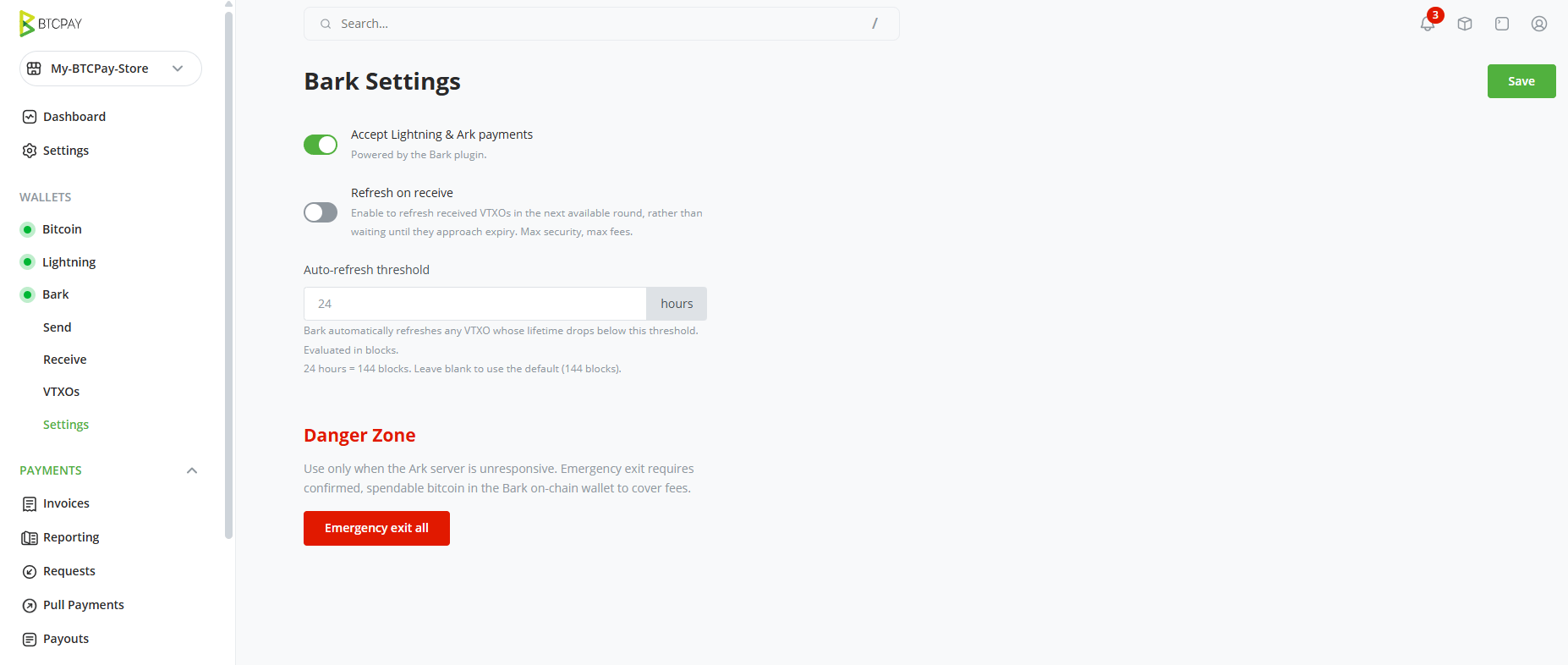 ### Accept Lightning & Ark payments
This toggle enables both Lightning and Ark payment methods at checkout.
When turned off, your checkout will show your native BTCPay on-chain wallet address only in the QR and payment link. Your Bark balances and settings remain untouched, and you can still send and receive from the admin panel.
### Refresh on receive
Off by default. When enabled, Bark refreshes each received VTXO in the next available [round](/docs/learn/rounds), rather than waiting until it approaches expiry.
Refreshing on receive provides maximum security, but it significantly increases the cost of receiving payments over Bark. See the [Ark receive](/docs/learn/payments#the-payment-security-trade-off) and [Lightning receive](/docs/learn/payments-lightning#trust-model-for-lightning-receive) trust models, and [Second's pricing](https://second.tech/pricing).
### Auto-refresh threshold
Bark automatically refreshes any VTXO whose remaining lifetime drops below this threshold. It's set in hours and evaluated in blocks; the default is 24 hours (144 blocks).
Refreshing is free within two days of expiry, and costs liquidity fees beyond that. So the default keeps automatic refreshes free, while a threshold above 48 hours trades fees for a wider safety margin before expiry. See [Second's pricing](https://second.tech/pricing) for the fee tiers.
High thresholds can result in significant costs and drain an off-chain balance. Anything above 14 days is strongly not advised.
### Backup
Select **View Seed** to display the wallet's recovery phrase. The phrase alone is not a complete backup: see [Back up your wallet](/docs/btcpay/backups).
### Danger Zone
**Emergency exit all** begins a process that reclaims your entire off-chain balance on-chain without the Ark server's cooperation, as described in [emergency exits](/docs/learn/exit).
Use this only when the Ark server is unresponsive and you can no longer spend your VTXOs. To complete an exit, each VTXO requires multiple on-chain transactions, so fees can be significant. If the server is still responding, making an on-chain payment from the [Send page](/docs/btcpay/send-receive#send-bitcoin) is faster and cheaper.
Before you can start an exit, the [Bark on-chain balance](/docs/btcpay/dashboard#the-bark-on-chain-balance-is-a-separate-wallet) needs at least 1,000 confirmed, spendable sats. That's the plugin's floor to start, not a fee estimate: the actual cost depends on fee rates and the number of VTXOs, so an exit can often require more.
Once started, the exit broadcasts its transactions in sequence, which takes time. Multiple VTXOs will be exited in parallel. You can follow progress on the [VTXOs page](/docs/btcpay/vtxos#track-exits).
If the exit starts and the on-chain balance is insufficient, the exit will pause and the plugin will prompt you to [Receive](/docs/btcpay/send-receive#receive-bitcoin) an on-chain payment.
Exited bitcoin lands in the Bark on-chain balance; withdraw it with [Send](/docs/btcpay/send-receive#send-bitcoin), using the on-chain source.
## Ark server and chain source
[You confirm these two endpoints at setup](/docs/btcpay/install#set-up-a-bark-wallet-for-your-store), and they can't be changed afterwards:
* **Ark server:** Second runs two servers: `https://ark.second.tech` on mainnet (the default) and `ark.signet.2nd.dev` on signet, for test deployments. Second doesn't run any other servers.
* **Chain source:** Any endpoint exposing the Esplora HTTP API, hosted or self-hosted: Esplora and mempool instances both work, while servers that only speak the Electrum protocol, such as a bare electrs, don't. The plugin checks that the endpoint serves the right network. The default is Second's `https://mempool.second.tech/api`.
## Lightning settings
A few Lightning-specific options live on the Lightning page: select **Lightning** in your store's sidebar, then open the **Settings** tab. With Bark managing Lightning, only part of that page applies.
### Enabled
This toggle enables the Lightning payment method at checkout on its own.
When turned off (with **Bark** > **Settings** > **[Accept Lightning & Ark payments](#accept-lightning-&-ark-payments)** still on), your checkout QR code and payment link no longer embed a Lightning invoice, even when the invoice has an amount. Ark and on-chain at checkout are unaffected. If **Accept Lightning & Ark payments** is turned off, this toggle is ignored.
### Display Lightning payment amounts in Satoshis
A checkout display preference: amounts show in sats instead of BTC. Works as usual with Bark.
### Unify on-chain and lightning payment URL/QR code
The plugin switches this on whenever Bark payments are enabled. The combined QR code and payment link at checkout depend on it, so leave it on.
### Settings that have no effect
Options tied to running your own Lightning node do nothing with Bark. The plugin requests invoices from the Ark server with only an amount, so **Description template of the lightning invoice** and **Add hop hints for private channels to the Lightning invoice** are ignored.
### Accept Lightning & Ark payments
This toggle enables both Lightning and Ark payment methods at checkout.
When turned off, your checkout will show your native BTCPay on-chain wallet address only in the QR and payment link. Your Bark balances and settings remain untouched, and you can still send and receive from the admin panel.
### Refresh on receive
Off by default. When enabled, Bark refreshes each received VTXO in the next available [round](/docs/learn/rounds), rather than waiting until it approaches expiry.
Refreshing on receive provides maximum security, but it significantly increases the cost of receiving payments over Bark. See the [Ark receive](/docs/learn/payments#the-payment-security-trade-off) and [Lightning receive](/docs/learn/payments-lightning#trust-model-for-lightning-receive) trust models, and [Second's pricing](https://second.tech/pricing).
### Auto-refresh threshold
Bark automatically refreshes any VTXO whose remaining lifetime drops below this threshold. It's set in hours and evaluated in blocks; the default is 24 hours (144 blocks).
Refreshing is free within two days of expiry, and costs liquidity fees beyond that. So the default keeps automatic refreshes free, while a threshold above 48 hours trades fees for a wider safety margin before expiry. See [Second's pricing](https://second.tech/pricing) for the fee tiers.
High thresholds can result in significant costs and drain an off-chain balance. Anything above 14 days is strongly not advised.
### Backup
Select **View Seed** to display the wallet's recovery phrase. The phrase alone is not a complete backup: see [Back up your wallet](/docs/btcpay/backups).
### Danger Zone
**Emergency exit all** begins a process that reclaims your entire off-chain balance on-chain without the Ark server's cooperation, as described in [emergency exits](/docs/learn/exit).
Use this only when the Ark server is unresponsive and you can no longer spend your VTXOs. To complete an exit, each VTXO requires multiple on-chain transactions, so fees can be significant. If the server is still responding, making an on-chain payment from the [Send page](/docs/btcpay/send-receive#send-bitcoin) is faster and cheaper.
Before you can start an exit, the [Bark on-chain balance](/docs/btcpay/dashboard#the-bark-on-chain-balance-is-a-separate-wallet) needs at least 1,000 confirmed, spendable sats. That's the plugin's floor to start, not a fee estimate: the actual cost depends on fee rates and the number of VTXOs, so an exit can often require more.
Once started, the exit broadcasts its transactions in sequence, which takes time. Multiple VTXOs will be exited in parallel. You can follow progress on the [VTXOs page](/docs/btcpay/vtxos#track-exits).
If the exit starts and the on-chain balance is insufficient, the exit will pause and the plugin will prompt you to [Receive](/docs/btcpay/send-receive#receive-bitcoin) an on-chain payment.
Exited bitcoin lands in the Bark on-chain balance; withdraw it with [Send](/docs/btcpay/send-receive#send-bitcoin), using the on-chain source.
## Ark server and chain source
[You confirm these two endpoints at setup](/docs/btcpay/install#set-up-a-bark-wallet-for-your-store), and they can't be changed afterwards:
* **Ark server:** Second runs two servers: `https://ark.second.tech` on mainnet (the default) and `ark.signet.2nd.dev` on signet, for test deployments. Second doesn't run any other servers.
* **Chain source:** Any endpoint exposing the Esplora HTTP API, hosted or self-hosted: Esplora and mempool instances both work, while servers that only speak the Electrum protocol, such as a bare electrs, don't. The plugin checks that the endpoint serves the right network. The default is Second's `https://mempool.second.tech/api`.
## Lightning settings
A few Lightning-specific options live on the Lightning page: select **Lightning** in your store's sidebar, then open the **Settings** tab. With Bark managing Lightning, only part of that page applies.
### Enabled
This toggle enables the Lightning payment method at checkout on its own.
When turned off (with **Bark** > **Settings** > **[Accept Lightning & Ark payments](#accept-lightning-&-ark-payments)** still on), your checkout QR code and payment link no longer embed a Lightning invoice, even when the invoice has an amount. Ark and on-chain at checkout are unaffected. If **Accept Lightning & Ark payments** is turned off, this toggle is ignored.
### Display Lightning payment amounts in Satoshis
A checkout display preference: amounts show in sats instead of BTC. Works as usual with Bark.
### Unify on-chain and lightning payment URL/QR code
The plugin switches this on whenever Bark payments are enabled. The combined QR code and payment link at checkout depend on it, so leave it on.
### Settings that have no effect
Options tied to running your own Lightning node do nothing with Bark. The plugin requests invoices from the Ark server with only an amount, so **Description template of the lightning invoice** and **Add hop hints for private channels to the Lightning invoice** are ignored.