> ## Documentation Index
> Fetch the complete documentation index at: https://second.tech/docs/llms.txt
> Use this file to discover all available pages before exploring further.
# Manage your VTXOs
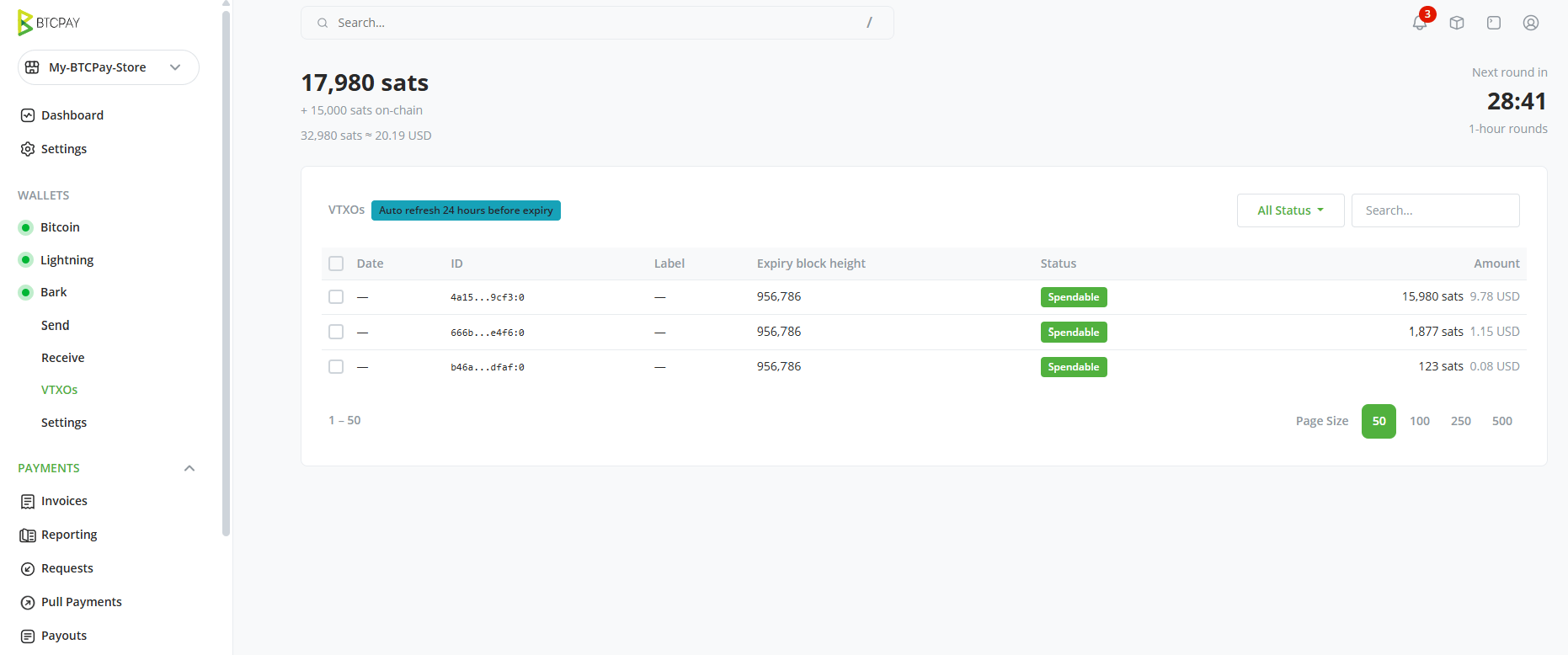
The VTXOs page shows a list of the [VTXOs](/docs/learn/vtxo) that make up your off-chain balance.
 ## The plugin refreshes VTXOs for you
VTXOs have a limited [lifetime](/docs/learn/lifetime): your wallet must periodically refresh them before expiry.
A badge at the top of the list shows the current auto-refresh threshold setting. By default, Bark will refresh any VTXO whose lifetime drops below 24 hours. You can tune the threshold, or even set the wallet to refresh every VTXO right after it's received, in [settings](/docs/btcpay/settings).
Refreshes are executed during [rounds](/docs/learn/rounds), which occur every hour. You'll see when the next round starts at the top of the VTXO page.
## Refresh or offboard manually
Advanced users may sometimes want granular control over their VTXOs. For example, a user who has received a particularly large VTXO might prefer to refresh before it gets to the refresh threshold, or to bring it on-chain.
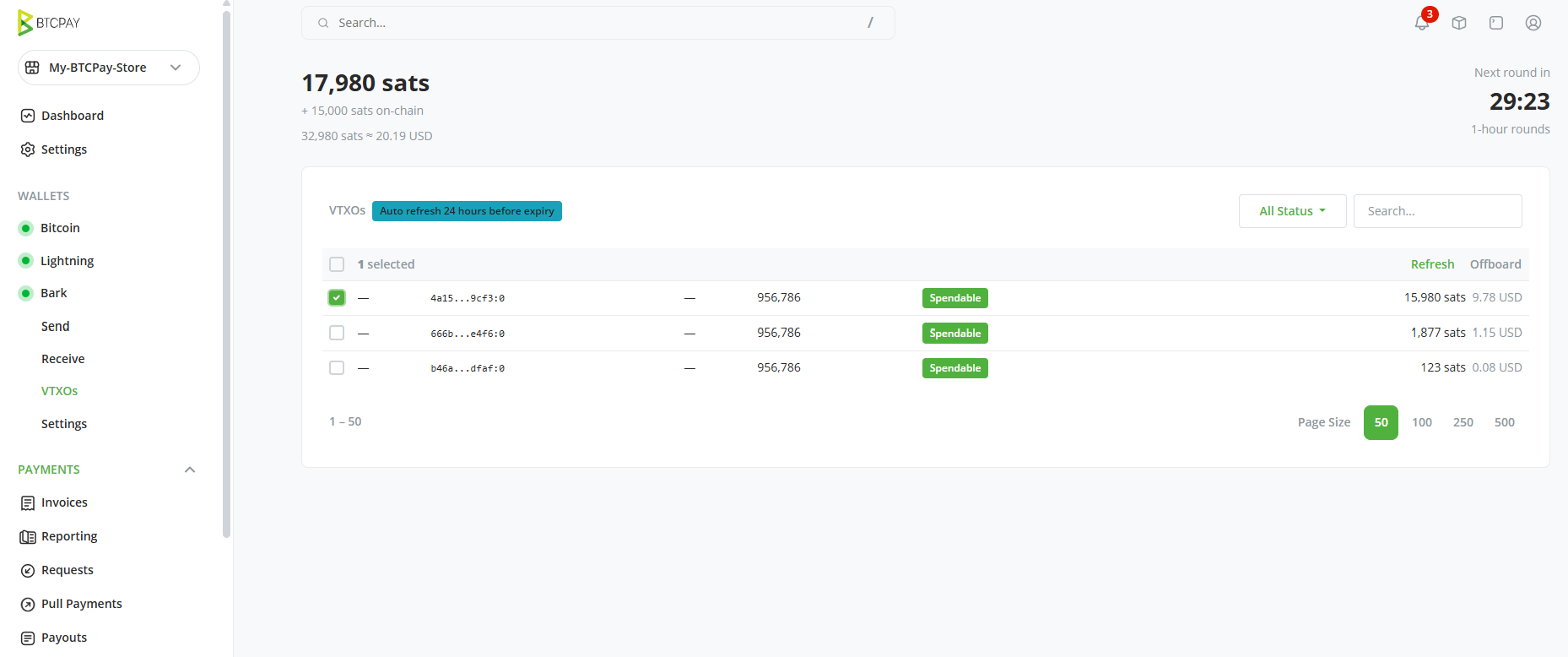
To act on individual VTXOs, just select one or more VTXOs from the list, then choose one of the options in the top-right of the table:
* **Refresh:** Mark the selected VTXOs for refresh in the next [round](/docs/learn/rounds). You forfeit the selected VTXOs and receive fresh ones.
* **Offboard:** Make an on-chain payment from the selected VTXOs. The bitcoin is delivered to your [Bark on-chain wallet](/docs/btcpay/dashboard#the-bark-on-chain-balance-is-a-separate-wallet), and BTCPay notifies you when the payment completes.
## The plugin refreshes VTXOs for you
VTXOs have a limited [lifetime](/docs/learn/lifetime): your wallet must periodically refresh them before expiry.
A badge at the top of the list shows the current auto-refresh threshold setting. By default, Bark will refresh any VTXO whose lifetime drops below 24 hours. You can tune the threshold, or even set the wallet to refresh every VTXO right after it's received, in [settings](/docs/btcpay/settings).
Refreshes are executed during [rounds](/docs/learn/rounds), which occur every hour. You'll see when the next round starts at the top of the VTXO page.
## Refresh or offboard manually
Advanced users may sometimes want granular control over their VTXOs. For example, a user who has received a particularly large VTXO might prefer to refresh before it gets to the refresh threshold, or to bring it on-chain.
To act on individual VTXOs, just select one or more VTXOs from the list, then choose one of the options in the top-right of the table:
* **Refresh:** Mark the selected VTXOs for refresh in the next [round](/docs/learn/rounds). You forfeit the selected VTXOs and receive fresh ones.
* **Offboard:** Make an on-chain payment from the selected VTXOs. The bitcoin is delivered to your [Bark on-chain wallet](/docs/btcpay/dashboard#the-bark-on-chain-balance-is-a-separate-wallet), and BTCPay notifies you when the payment completes.
 Refreshing is free during a VTXO's final two days of lifetime; refreshing earlier than that costs [liquidity fees](/docs/btcpay/settings#auto-refresh-threshold).
To bring off-chain bitcoin on-chain, most users will prefer to use the [Send](/docs/btcpay/send-receive#send-bitcoin) page instead. You can send from your off-chain balance to an on-chain address.
## Track exits
If an [emergency exit](/docs/btcpay/settings#danger-zone) is in progress, this page is where you follow it: the exiting VTXOs switch to exiting and exited statuses with progress detail, and an exiting sub-balance appears under the main balance at the top of the page until every VTXO has been claimed on-chain.
Refreshing is free during a VTXO's final two days of lifetime; refreshing earlier than that costs [liquidity fees](/docs/btcpay/settings#auto-refresh-threshold).
To bring off-chain bitcoin on-chain, most users will prefer to use the [Send](/docs/btcpay/send-receive#send-bitcoin) page instead. You can send from your off-chain balance to an on-chain address.
## Track exits
If an [emergency exit](/docs/btcpay/settings#danger-zone) is in progress, this page is where you follow it: the exiting VTXOs switch to exiting and exited statuses with progress detail, and an exiting sub-balance appears under the main balance at the top of the page until every VTXO has been claimed on-chain.