

Name the sources your app can pay from
List the sources before you design the screen. A wallet app integrating Bark can have up to three for an on-chain send:- Your app’s own native on-chain wallet: Only if the app has one alongside Bark.
- Bark’s built-in on-chain wallet: The balance that also pays emergency exit fees.
- The Ark balance: Paid through
sendOnchainin the SDK,bark send-onchainon the CLI,POST /api/v1/wallet/send-onchainon Barkd, or an offboard back to the user’s own on-chain wallet (payment flows covers the confirmation states).
Pick a selection design
Choose one of three designs and apply it to every on-chain send:- Explicit selection: Show a payment-source picker on every on-chain send, with one source preselected.
- Background selection: Spend from a default source, and fall through to the other when it is empty. This hides the choice entirely, which fits UX-focused wallet apps (spend the Ark balance first, then the on-chain balance down to a reserve sufficient to cover emergency exits).
- Force one source: Route every on-chain send through the Ark balance. Use Bark’s on-chain wallet as an emergency exit reserve.
Show the picker with the Ark balance preselected
For explicit selection, show a source picker when the user enters or scans an on-chain address. List “Ark balance: 750,000 sats” above “On-chain balance: 350,000 sats”, with the Ark balance preselected:- Protect the exit reserve: Defaulting to the on-chain wallet can cost less, depending on the server’s on-chain payment fees and the feerate. If your app holds an exit reserve there, it also invites users to drain the bitcoin that pays emergency exit fees, forced exits included.
- Expose Bark’s on-chain wallet: The picker also gives users a way to empty it without a separate menu item.
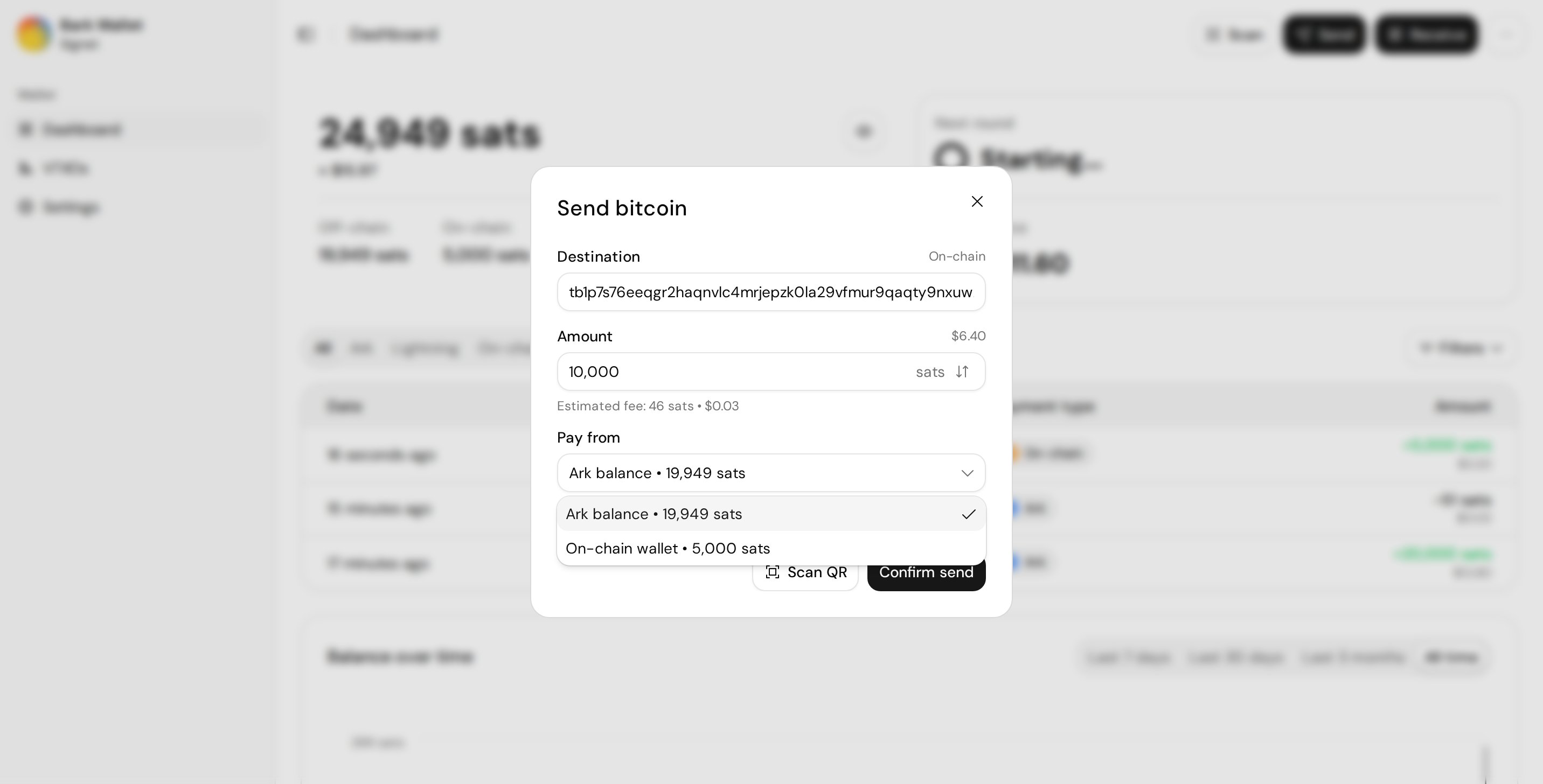
When the user pays an on-chain address, Bark Wallet preselects the Ark balance while it holds spendable sats
How Bark Wallet does it
How Bark Wallet does it
- Entry point: Bark Wallet shows a “Pay from” picker only when the destination is an on-chain address.
- Options: “Ark balance • 750,000 sats” and “On-chain wallet • 350,000 sats + 20,000 sats pending”.
- Default: The Ark balance is preselected while it holds spendable sats. With none, the default flips to the on-chain wallet when that side holds bitcoin.
- Routing: Selecting the on-chain wallet routes the send through Bark’s on-chain wallet instead of forfeiting VTXOs.
- Error: An amount that, with its estimated fee, exceeds the chosen source’s displayed total fails with “Insufficient bitcoin. Available: X”.